Student ID - app - Kunnskapsbasen
Student ID - app
As a student at NTNU you need both a Student Card and Student ID app. The student ID app is accepted as valid ID by student welfare organizations and public transport companies in Norway. You need to pay the semester fee and register for the semester before use.
Norsk versjon - Studentbevis - app
Topic page for new international students.

Download the Student ID
When you have paid the semester fee, registered in Studentweb and activated your user account you can download the Student ID app.
- Download the app Student ID from iOS App Store or Google Play (Android)
- Log into the app: Choose the affiliation NTNU, and log in with your regular NTNU username and password.
- Allow use of your student card photo. Before your student ID card photo can be used by this app, you have to grant NTNU explicit permission to use your photo. You sign this agreement in Studentweb. The photo will not show up in the app for new students until week 33, when you physical student ID card is produced.
Valid Student ID
The Student ID app will automatically be updated when you have paid the semester fee and registered for the semester.
Note! Exchange students from partner universities do not need to pay the semester fee.

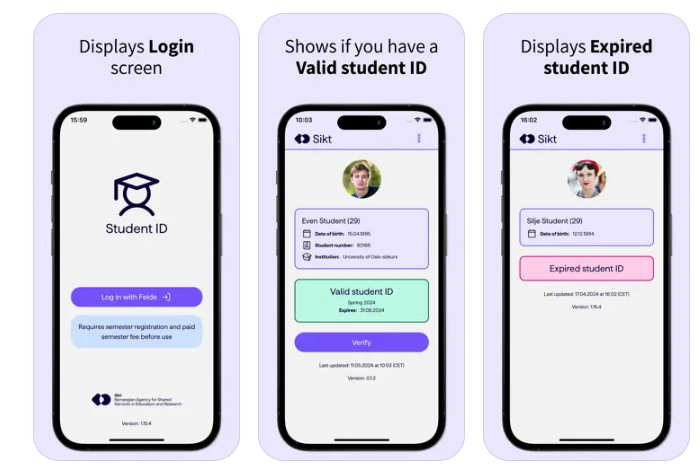
When you have paid the semester fee and registered as a student, this will be visible in a green box at the bottom of the page. The receipt itself is stored in the app, so after logging in and registering the paid semester fee in the app, the app can be used without internet access.
The app will update itself every time you open it, or by pulling down the screen. Without internet access, the app will read stored data and at the bottom there is a "Last updated" line showing the date and time for the last time fresh data was retrieved. When logging out, stored data will be removed.
Note! When logging in, you will always need internet access, but you will remain logged in even if you close the application.
European Student Card
In Studentweb, you can activate the European Student Card (ESC). When this is activated, you will see a QR-code in the student ID-app. The QR-code is used as a digital student-ID in all countries participating in the Erasmus program. The European Student Card is valid in Europe in the same way as a physical student-ID and semester receipt.
Read more about the European Student Card.
Student receipt in paper version
The digital Student ID replaces the semester receipt in paper version. You need a smartphone with iOS (iPhone), Android, or Windows to use this app. If you do not have a smartphone that supports this app and you need a paper version of the semester card, you can order one in Student Web.
You can order the paper version by navigating to More > Orders > Semester receipt > Order.
Valid ID on exams
You need to bring personal ID like your student card (not student ID app), bank card (with photo) or passport to your exams. The student ID app can not be used as valid ID on your exams.
Contact
Contact Orakel Support Services if you need assistance. Exchange students should contact the Unit for International Relations.